Supabase functions
Recently I started to work with Supabase, which I must admit is a joy to use!, but I was stuck on some logic I wanted to do which is to create an organization and a user profile when a new user signs up. So naturally I started to read about supabase functions which are PostgreSQL functions.
It wasn't a very easy thing to do, since I hadn't used PostgreSQL since version 9 and I didn't know about all the latest and greatest, but that didn't stop me from Google searching it, asking ChatGPT about it, watching some YouTube tutorials, and reading some blog posts on it - I couldn't find anything close to what I needed to achieve. So I put on some old school music and got to work - played with it for hours while reading the PostgreSQL documentation, and finally I succeeded!
As I said before, I couldn't find anyone that published something close to it, so I figured I have to.
The signup method looks like this:
const { data, error } = await supabase.auth.signUp({
  email: localState.email,
  password: localState.password,
  options: {
    data: {
      first_name: localState.firstName,
      last_name: localState.lastName,
      organization_name: localState.organizationName,
    },
  },
});
As you can see, there is the email and password, which is passed to the signUp method, but the extra information is first_name and last_name which I wanted to put in the profiles table, and the organization_name which I wanted to put in the organizations table. And, of course, linked them all together with some old school foreign keys.
1. Tables
So, first let's create the profiles table:
create table profiles (
  id uuid references auth.users on delete cascade not null primary key,
  created_at timestamp with time zone,
  updated_at timestamp with time zone,
  first_name text,
  last_name text,
  phone text,
  organization_id uuid references public.organizations on delete cascade not null,
);
And now let's create the organizations table:
create table organizations (
  id uuid not null primary key,
  created_at timestamp with time zone,
  updated_at timestamp with time zone,
  name text,
);
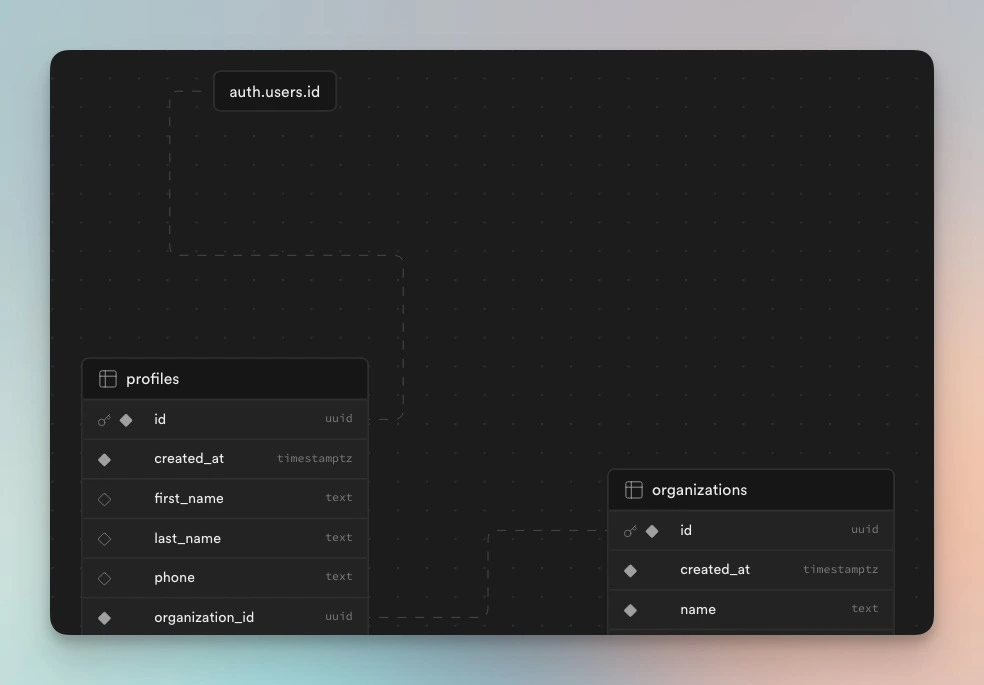
As you can see the profiles table is the one linking between the user from auth table and the organization from organizations table. And you can head over to the Database tab to see the schema in a graphical representation with Supabase Schema Visualizer:
2. Function
Now it's time to create the function itself. The function should get the organization_name and create a new organization in the organizations table. We should save the organization's newly created id to then use it when we create a new profile in the profiles table, along with the first_name and last_name from the signUp extra options.
create or replace function handle_new_org_and_profile() returns trigger as $$
declare
  org_id uuid;
begin
  -- insert new organization
  insert into public.organizations(name)
  values (new.raw_user_meta_data->>'organization_name')
  returning id into org_id;
  --  insert new profile
  insert into public.profiles (id, first_name, last_name, organization_id)
  values (new.id, new.raw_user_meta_data->>'first_name', new.raw_user_meta_data->>'last_name', org_id);
  return new;
end;
$$ language plpgsql security definer;
The object from the signUp call is hosted in this new variable, and the extra options are in the raw_user_meta_data field. The two separate insert statements don't share a state, but we need to take the newly created organization id somehow. To do that we declare an id at the top of the function which every statement in the function can access too.
We returning the id from the insert command into the org_id variable we declared. Then we can use it in the next insert statement for our organization_id column.
3. Trigger
Finally, we somehow need to call this function automatically every time a new row is created in the auth.users table, and we can do that with triggers. So let's create a trigger to execute the handle_new_org_and_profile function we created above for each row in auth.users after the database inserts the row.
create trigger on_auth_user_create_org_and_profile
  after insert on auth.users
  for each row execute procedure handle_new_org_and_profile();
4. Summary
You're now all set.